Where was this video taken?
Drop any MP4 or MOV clip to extract 6 sharp keyframes locally, audit QuickTime mvhd / ©xyz atoms, and triangulate filming coordinates.
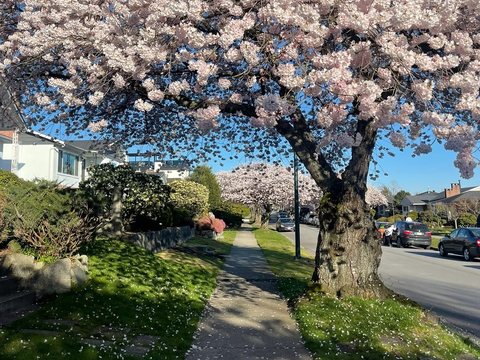
West 60th Ave, Marpole, Vancouver
49.2160° N, 123.1093° W · ±85m radius
Mature Akebono cherry trees planted at 9m intervals match Vancouver Street Tree GIS dataset along W 60th Ave.
Timber distribution pole transformer bracket and broom-finished concrete apron match British Columbia municipal standards.
▸ Technical Specifications & Verification FAQ↓
To find where a video was taken, scrub through the clip to isolate the sharpest widest-angle keyframe showing stationary horizon lines, road signs, or utility infrastructure. LocatePic extracts lossless canvas frames from MP4/MOV files locally and runs 5-node cartographic triangulation.
Why is video geolocation often more accurate than a single photo?
A 10-second video clip pans across multiple angles—often revealing a street sign in second 02, a power pole in second 05, and a mountain skyline in second 08. Extracting the clearest frame unlocks clues a single angle might miss.
Do MP4 and MOV videos contain hidden GPS metadata like photos do?
Original iPhone (.MOV) and Android/drone (.MP4) files store ISO-6709 GPS coordinates inside the QuickTime udta/xyz atom. Social media platforms strip this atom, which is why our keyframe optical workbench is essential.
Is my video file uploaded to a server when I extract frames?
No. Video decoding and canvas frame capture happen 100% inside your local browser GPU/RAM.